This post contains affiliate links. If you buy through them, we may earn a small commission at no extra cost to you.
⭐ Our Top Pick
🏆 Best Overall: Furbo 360° Dog & Cat Camera with Treat Toss — A rotating 360° lens, treat tossing, and pet-specific meow alerts make it the most complete way to watch your cat from work.
💰 Best Value: Wyze Cam v4 Indoor Security Camera — Sharp 2.5K video and reliable motion alerts for under $40 if you don't need treat tossing.
Introduction
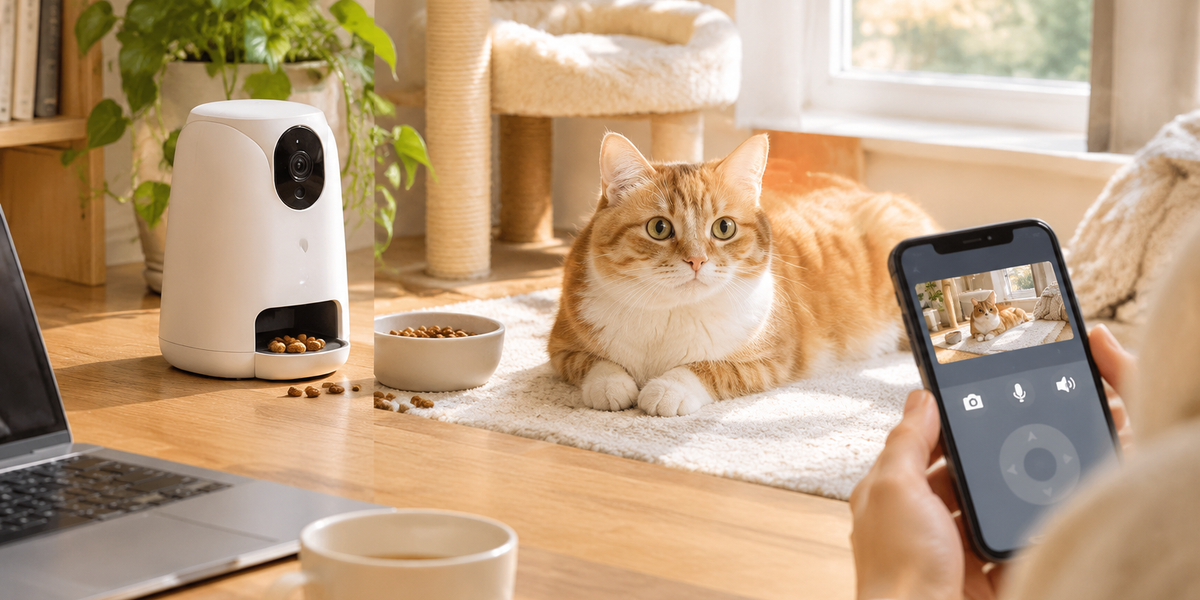
Leaving your cat home alone while you head to the office can feel like a small daily heartbreak. You wonder if they're napping in the sun, knocking a glass off the counter, or pacing by the door. In 2026, a well-placed pet camera closes that gap — you can peek in during a coffee break, hear a meow through two-way audio, and even toss a treat across the room to break up a long afternoon.
We've spent time comparing the current crop of cat cameras, treat dispensers, and alert systems based on manufacturer specs, verified buyer reviews, and real-world setup feedback. The good news: you don't need a complicated smart-home setup to get this working. A single WiFi camera, a stable outlet, and about 20 minutes of configuration is enough to turn your phone into a window into your cat's day.
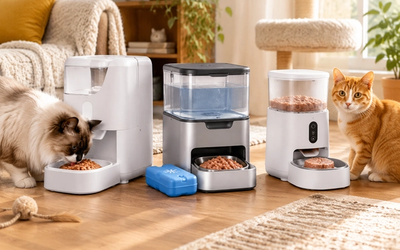
This guide walks through placement angles, treat dispenser mechanics, motion alert tuning, and the specific cameras that do each job best. If you're also thinking about automating meals while you're out, our guide to the Best Smart Cat Feeders with Camera and Portion Control 2026 pairs naturally with a camera setup.
💡 Pro Tip: Set up your camera and test it for a full day on a weekend before relying on it during the workweek. You'll catch angle problems, WiFi dead zones, and false alerts while you're still home to fix them.
What to Look For
- Field of view and rotation. A fixed lens covers one zone; a 360° rotating camera can sweep an entire room from a single outlet. For cats, wide-angle (110°+) or pan-tilt models reduce the number of cameras you need.
- Treat dispenser range and capacity. Treat tossers vary in how far they fling a kibble and how many treats they hold. If you have multiple cats, a larger hopper and adjustable toss distance matter more than video resolution.
- Motion and sound alert quality. Look for adjustable sensitivity and pet-specific detection. Too-sensitive alerts will ping you every time a curtain moves; too-dull alerts miss your cat entirely.
- Two-way audio. A clear speaker lets you talk to your cat and, more importantly, lets you hear distress meows, vomiting, or unusual vocalizing.
- Night vision. Cats are crepuscular — most active at dawn and dusk. Color or infrared night vision keeps the feed usable when the room dims.
- Storage and subscription model. Some cameras store locally on microSD (no fees), while others gate video history and smart alerts behind a monthly plan. Factor that into the total cost.
Best Cat Cameras for Watching Your Cat at Work
Furbo 360° Dog & Cat Camera with Treat Toss
| Criteria | Score |
|----------|-------|
| Coverage & Rotation | 10/10 |
| Treat Dispenser | 9/10 |
| Alert Quality | 9/10 |
| Value | 7/10 |
The Furbo 360° is the camera we'd reach for first if you want the full experience: see, speak, and toss a treat without moving from your desk. The rotating lens sweeps a full room, so a single unit on a bookshelf can follow your cat from the couch to the food bowl. Buyer reviews consistently praise the treat toss reliability and the meow/bark alerts, which are tuned to fire on pet sounds rather than every ambient noise. Color night vision keeps the feed readable after sunset.
The main trade-off is cost. At around $199, it's the priciest option here, and the best smart alerts and video history sit behind a subscription. If you want a no-compromise cat camera and don't mind the fee, it's the one to beat.
✅ Pros:
- 360° rotation covers an entire room from one outlet
- Reliable treat toss and pet-specific meow alerts
- Color night vision plus clear two-way audio
❌ Cons:
- Premium price and a subscription for full features
- Larger footprint than a basic security cam
Petcube Bites 2 Lite Treat Camera
| Criteria | Score |
|----------|-------|
| Coverage & Rotation | 6/10 |
| Treat Dispenser | 8/10 |
| Alert Quality | 8/10 |
| Value | 9/10 |
The Petcube Bites 2 Lite is the sweet spot for treat tossing on a budget. It delivers 1080p video, two-way audio, and an adjustable treat dispenser that flings kibble a satisfying distance across the room. Verified buyers like that it's compact enough for a shelf and that the app is straightforward to set up.
The catch is the fixed lens. You'll need to place it thoughtfully to cover your cat's favorite zones, and the treat compartment is on the small side if you're dispensing to more than one cat. Still, for under $150 it's an easy recommendation.
✅ Pros:
- Treat dispenser with adjustable toss distance
- Compact, shelf-friendly design
- Solid 1080p video and two-way audio for the price
❌ Cons:
- Fixed lens requires careful placement
- Small treat capacity for multi-cat homes
Wyze Cam v4 Indoor Security Camera
| Criteria | Score |
|----------|-------|
| Coverage & Rotation | 7/10 |
| Treat Dispenser | N/A |
| Alert Quality | 8/10 |
| Value | 10/10 |
If you just want to watch your cat — no treats, no frills — the Wyze Cam v4 is the value champion. It shoots crisp 2.5K video, stores locally on a microSD card so you're not forced into a subscription, and sends dependable motion and sound alerts through the Wyze app. At under $40, you could place two of them for the price of one premium camera.
The trade-offs are clear: no treat dispenser, and the pet-specific AI detection requires a Cam Plus subscription. But as a pure "check on my cat from work" camera, it's hard to argue with.
✅ Pros:
- Excellent 2.5K video for under $40
- Local microSD storage — no mandatory subscription
- Reliable motion and sound alerts
❌ Cons:
- No treat dispenser
- Pet AI detection needs a paid plan
PetSafe Smart Feed Automatic Cat Feeder with Camera
| Criteria | Score |
|----------|-------|
| Coverage & Rotation | 6/10 |
| Treat Dispenser | 7/10 |
| Alert Quality | 7/10 |
| Value | 7/10 |
If your cat thrives on routine, the PetSafe Smart Feed is a feeder-camera hybrid worth considering. It schedules up to 12 meals a day with portion control, offers slow-feed and feed-now options from the app, and works with Alexa for voice check-ins. The built-in camera lets you confirm your cat actually ate.
It's not a treat tosser, and WiFi setup can be finicky on 5GHz networks, so plan to use a 2.4GHz band. But if scheduled meals plus a visual confirmation matter more than playtime, it's a strong pick. For more on feeder-camera hybrids, see our roundup linked above.
✅ Pros:
- Up to 12 scheduled meals with portion control
- Slow-feed and feed-now options from the app
- Alexa integration for voice check-ins
❌ Cons:
- No treat tossing — meals only
- WiFi setup can be tricky on 5GHz
Placement, Treat Dispensers & Motion Alerts: Setup Guide
- Pick the room your cat actually uses. Watch where your cat spends the day — usually a sunny window, a favorite chair, or near the food bowl. Place the camera there, not in a decorative spot.
- Elevate the camera to cat height or slightly above. A shelf or counter at roughly 3–5 feet gives a natural viewing angle and reduces the chance your cat bats the camera.
- Secure the cable. Cats chew cords. Use a cable raceway or cord cover, and plug into a surge protector.
- Test treat toss distance. Start with the shortest toss setting, then increase until treats land where your cat actually hangs out. Aim for a soft landing zone, not near stairs.
- Tune motion alerts. Lower sensitivity first, then raise it until you're only getting pinged for real movement. Set a schedule so alerts don't wake you at 3 a.m.
- Enable two-way audio and test the speaker. Say your cat's name and watch for a head turn — that confirms the audio is audible from across the room.
If you're also automating litter care while you're out, our guide to the Best Self-Cleaning Litter Boxes for Multiple Cats 2026 is a useful companion read.
💡 Pro Tip: Place a treat dispenser so treats land on a washable mat or hard floor — not carpet. It keeps cleanup quick and prevents your cat from hunting crumbs later.
Frequently Asked Questions
Do I need WiFi for a pet camera to work?
Yes — most pet cameras stream over your home WiFi network. A stable 2.4GHz connection is usually the most reliable; some models also support 5GHz.
Can a pet camera help with separation anxiety in cats?
It can help you monitor behavior and provide comfort through two-way audio and treat tossing, but it isn't a cure. If your cat shows signs of distress, talk to your vet about a broader plan.
How many cameras do I need for one cat?
One well-placed 360° camera or two fixed cameras usually cover a single cat's main areas. Start with one and add a second if you notice blind spots.
Will motion alerts work if my cat is small?
Yes, but you may need to raise sensitivity. Pet-specific detection models handle small animals better than generic motion sensors.
Are treat dispensers safe for cats on a diet?
Use them with your vet's guidance. Treats should stay under about 10% of daily calories, so measure portions and account for them in your cat's overall intake.
Final Thoughts
Setting up a pet camera to watch your cat at work is one of the highest-return upgrades you can make to your cat's daily life — and yours. Start with placement: put the camera where your cat actually spends time, secure the cable, and test the angle for a full day before you rely on it. Then layer in treat tossing and tuned motion alerts so the setup feels interactive rather than passive.
If you want the full experience, the Furbo 360° is our top pick for its rotating lens and reliable treat toss. If you'd rather spend less and skip treats, the Wyze Cam v4 delivers outstanding value. Whichever you choose, a little setup now means fewer worries and more mid-day meow check-ins later.
Editor's Choice
- Best Overall: Furbo 360° Dog & Cat Camera with Treat Toss — 360° coverage, treat tossing, and pet-specific alerts in one device.
- Best Value: Wyze Cam v4 Indoor Security Camera — 2.5K video and dependable alerts for under $40.
- Best Treat Camera on a Budget: Petcube Bites 2 Lite Treat Camera — treat tossing and two-way audio without the premium price.