Disclosure: This post contains affiliate links. As an Amazon Associate, we earn from qualifying purchases at no extra cost to you. We only recommend products we've researched based on specs and verified buyer reviews.
⭐ Our Top Pick
🏆 Best Overall: Furbo 360° Cat Camera — 360° pan/tilt and treat tossing keep your cat entertained while you're away.
💰 Best Value: Petcube Bites 2 Lite — reliable treat dispensing at a more accessible price.
Introduction
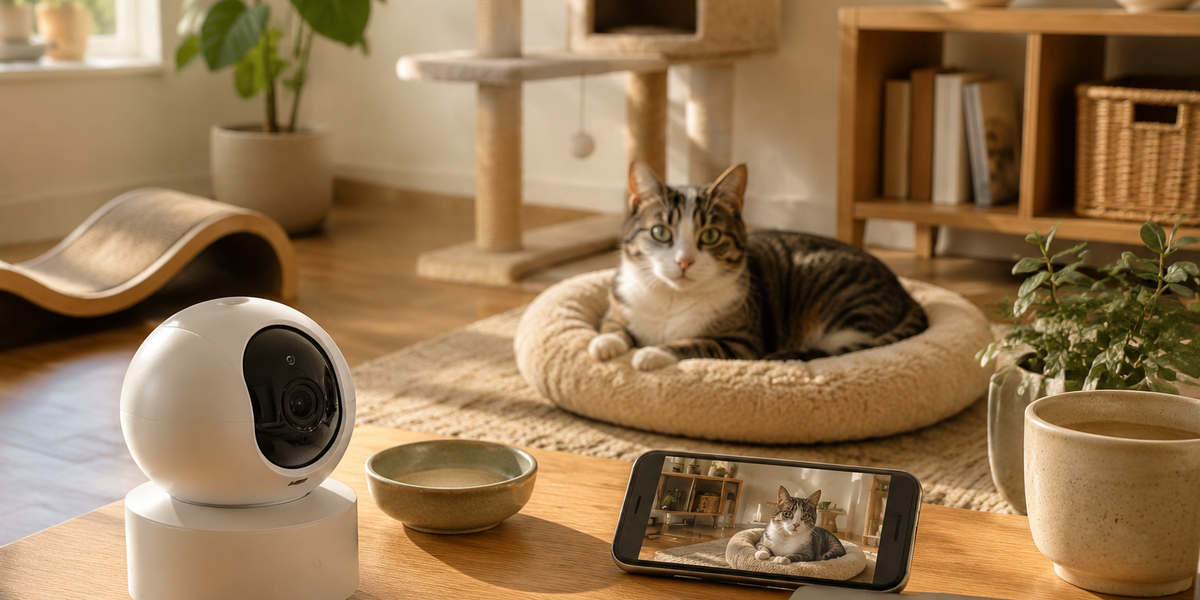
Leaving your cat home alone while you head to the office can be stressful—for both of you. Are they sleeping? Getting into mischief? Crying at the door? A pet camera gives you a window into their day, letting you check in, talk to them, and even toss a treat when they're being good.
In this guide, we'll walk you through the entire setup process, from choosing the right camera to positioning it for the best view and connecting it to your home Wi-Fi. We've compared the top models on the market based on specs and thousands of buyer reviews, so you can pick the perfect one for your feline friend.
By the end, you'll have a fully operational pet camera that gives you peace of mind—and a happier, more engaged cat.
What to Look For
- Video Quality: Look for at least 1080p HD resolution. Night vision is essential if your cat is active after dark. Some cameras offer color night vision for clearer images.
- Pan/Tilt vs. Fixed: Pan/tilt cameras let you follow your cat around the room. Fixed cameras are simpler but may miss action outside their field of view.
- Two-Way Audio: The ability to talk to your cat (and hear them) is a must for interactive monitoring. Some cats respond well to your voice, reducing separation anxiety.
- Treat Dispensing: A built-in treat tosser can turn monitoring into a fun game, rewarding your cat for good behavior. Check treat size compatibility to avoid jams.
- Smart Alerts & AI: Cameras with motion detection and pet-specific alerts (like "cat detected") reduce false notifications. Some offer activity zones so you only get alerts for key areas.
- Privacy & Security: Consider cameras with local storage options, encryption, and privacy modes that shut off the camera when you're home.
Product Deep-Dive
Furbo 360° Cat Camera
| Criteria | Score |
|----------|-------|
| Pan/Tilt Coverage | 9.5/10 |
| Video & Audio Quality | 9/10 |
| Interactive Features | 9.5/10 |
| Value for Money | 7.5/10 |
This is the gold standard for cat parents. The 360° pan/tilt means you can follow your cat from room to room (as long as it's in the same space). The 1080p video is sharp, and the two-way audio lets you chat with your kitty. The treat tossing is a huge hit—you can dispense a snack remotely, which many reviewers say keeps their cats engaged and happy. AI alerts distinguish between cats and people, so you won't get false alarms from shadows.
✅ Pros:
- Full 360° coverage with smooth pan/tilt
- Treat tossing is a great enrichment tool
- AI alerts specifically for cats
❌ Cons:
- Pricey compared to basic cameras
- Some advanced features require a subscription
Petcube Bites 2 Lite
| Criteria | Score |
|----------|-------|
| Treat Dispensing | 9/10 |
| Video Quality | 8.5/10 |
| Ease of Setup | 9/10 |
| Value for Money | 9/10 |
If you want treat tossing without the premium price, the Bites 2 Lite is a fantastic choice. It offers 1080p HD video, night vision, and two-way audio. The treat dispenser works reliably, and you can schedule treat times or dispense on demand. Setup is straightforward, and the app is intuitive. The fixed view is fine for most rooms, but you'll need to position it carefully.
✅ Pros:
- Affordable treat dispenser
- Crisp video with night vision
- User-friendly app
❌ Cons:
- No pan/tilt, so limited coverage
- Treats can jam if not the right size
Wyze Cam Pan v3
| Criteria | Score |
|----------|-------|
| Value for Money | 10/10 |
| Pan/Tilt | 8.5/10 |
| Video Quality | 8/10 |
| Ease of Setup | 9/10 |
For budget-conscious pet parents, the Wyze Cam Pan v3 is unbeatable. It offers pan/tilt, color night vision, and 1080p video at a fraction of the cost of premium models. There's no treat dispenser, but you get reliable motion alerts and the option for local SD card storage, so you don't need a subscription. Setup takes minutes, and the app works well.
✅ Pros:
- Extremely affordable
- Pan/tilt and color night vision
- No subscription required for core features
❌ Cons:
- No treat dispenser
- SD card not included
Tapo C210 Pan/Tilt Camera
| Criteria | Score |
|----------|-------|
| Video Quality | 9/10 |
| Value for Money | 9.5/10 |
| Pan/Tilt | 8/10 |
| Ease of Setup | 8.5/10 |
Another budget star, the Tapo C210 offers 2K QHD resolution—sharper than most in its price range. It has pan/tilt, motion tracking, and two-way audio. The app is a bit clunky, but it's functional. With local storage via microSD, you can record continuously without monthly fees.
✅ Pros:
- Superb video quality for the price
- Pan/tilt and motion tracking
- Local storage option
❌ Cons:
- No interactive features like treat tossing
- App interface could be better
Eufy Pet Camera D605
| Criteria | Score |
|----------|-------|
| Privacy Features | 9.5/10 |
| AI Alerts | 9/10 |
| Video Quality | 8.5/10 |
| Value for Money | 8/10 |
Privacy-conscious cat owners will love the Eufy D605. It includes a physical privacy shutter that completely covers the lens when you're home. It also has AI cat detection with activity zones, so you only get alerts when your cat is in a specific area. Two-way audio lets you check in. While it lacks a treat dispenser, the smart alerts and privacy features make it a solid choice.
✅ Pros:
- Physical privacy shutter
- AI cat detection with activity zones
- No subscription needed
❌ Cons:
- No treat tossing
- Live view can be slow to load
Frequently Asked Questions
How do I position my pet camera for the best view?
Place the camera at cat height (about 2-3 feet off the ground) to get a face-level view. Avoid pointing it directly at windows, as glare can wash out the image. Choose a spot where your cat spends most of their time, like near a favorite perch or bed.
Do I need a subscription for a pet camera?
Not necessarily. Many cameras offer free cloud storage for a limited time or local SD card recording. Premium features like extended cloud history or advanced AI often require a subscription, but basic monitoring is usually free.
Can my cat see me through the camera?
Not visually, but they can hear you through the two-way audio. Talking to your cat can reassure them, but some cats may be confused. Start with short, calm messages to see how your cat reacts.
How do I set up the camera on Wi-Fi?
Most cameras use a companion app. Download the app, create an account, plug in the camera, and follow the in-app instructions to connect to your 2.4 GHz Wi-Fi network. Make sure your Wi-Fi signal is strong at the camera's location.
Are pet cameras safe and private?
Choose cameras with encryption, secure login, and privacy modes. Some models have physical shutters. Always change default passwords and keep firmware updated.
Final Thoughts
Setting up a pet camera is one of the best investments you can make for your cat's well-being—and your own peace of mind. Whether you choose a feature-rich model like the Furbo 360° or a budget-friendly option like the Wyze Cam, the key is to get it positioned correctly and connected to reliable Wi-Fi.
We recommend starting with the Furbo 360° Cat Camera for the most interactive experience. If you're on a budget, the Wyze Cam Pan v3 offers excellent value.
Editor's Choice
- Best Overall: Furbo 360° Cat Camera — 360° coverage, treat tossing, and AI alerts.
- Best Value: Petcube Bites 2 Lite — reliable treat dispenser at a lower price.
- Budget Pick: Wyze Cam Pan v3 — affordable pan/tilt with no subscription needed.