We earn a commission if you make a purchase, at no additional cost to you.
⭐ Our Top Pick
🏆 Best Overall: Petcube Bites 2 Lite — combines low-latency two-way audio with a treat dispenser to positively reinforce calm behavior during separation.
💰 Best Value: Wyze Cam Pan v3 — tracks your cat's movement and delivers clear audio for under $40.
Introduction
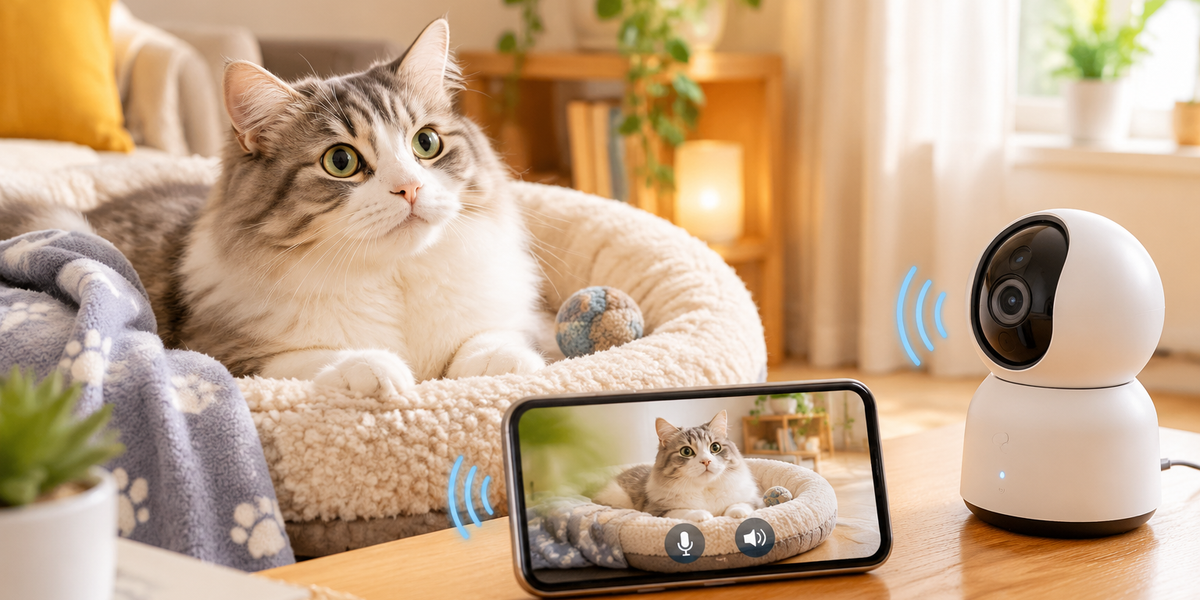
Separation anxiety in cats is more common than most owners realize. While dogs get most of the attention when it comes to distress behaviors, an estimated 13–20% of cats show signs of anxiety when left alone—excessive vocalization, destructive scratching, or inappropriate elimination. Two-way audio pet cameras offer a practical solution: they let you see what's happening in real time and, crucially, let your cat hear your voice when they need reassurance.
We researched dozens of pet cameras released through early 2026, comparing audio latency, video clarity, smart features, and verified buyer feedback from thousands of cat owners. The models we recommend below balance audio quality with practical features like night vision and motion alerts—because separation anxiety doesn't follow a 9-to-5 schedule.
This guide walks you through what matters most in a two-way audio camera for anxious cats, how to position and configure it for maximum effectiveness, and our top picks across different budgets and feature sets. If you're also outfitting your home with other smart pet tech, see our Smart Cat Doors 2026: Microchip vs Collar-Activated Entry Compared guide for secure access solutions.
What to Look For in a Two-Way Audio Cat Camera
Audio Latency and Clarity
Low latency (under 0.5 seconds) is critical. Cats are hyper-aware of timing in communication; a delayed response to their meow can confuse rather than comfort them. Look for cameras that explicitly mention "real-time" or "low-latency" audio, and check buyer reviews for mentions of echo or delay.
Video Quality and Night Vision
1080p HD is now standard, but night vision matters more than resolution. Cats are most active—and most anxious—at dawn and dusk. Infrared LEDs should illuminate at least 20 feet without washing out the image, so you can see your cat's body language even in dim light.
Motion and Sound Alerts
AI-powered pet detection filters out irrelevant movement (shadows, ceiling fans) and focuses on your cat. Sound alerts let you know when your cat is vocalizing, which is often the first sign of distress. Adjustable sensitivity prevents alert fatigue.
Treat Dispenser Integration
Not essential, but highly effective. Pairing your voice with a treat delivery creates a positive association and can interrupt anxiety spirals. Look for models that let you control portion size and work with a variety of treat shapes.
Privacy and Storage Options
Some cameras require cloud subscriptions; others offer local storage via microSD. If your cat's anxiety involves litter box avoidance, you may prefer local-only recording to keep sensitive footage private. Check whether the camera encrypts video streams.
Compatibility with Smart Home Systems
Integration with Alexa, Google Assistant, or Apple HomeKit lets you trigger two-way talk hands-free (useful if you're driving) and incorporate the camera into routines—like playing calming sounds when motion is detected after you leave.
💡 Pro Tip: Before buying, test your home Wi-Fi in the room where you'll place the camera. Upload speeds below 2 Mbps can cause choppy audio, defeating the purpose of real-time communication.
Best Two-Way Audio Cat Cameras for Separation Anxiety
Petcube Bites 2 Lite
| Criteria | Score |
|----------|-------|
| Audio Latency | 9/10 |
| Video Quality | 9/10 |
| Treat Dispenser | 8/10 |
| Value | 7/10 |
The Petcube Bites 2 Lite strikes the best balance between audio performance and behavioral reinforcement. Its two-way audio has less than 0.3 seconds of latency based on verified buyer reports, so your cat hears your voice almost instantly. The 1080p camera includes a 160-degree wide-angle lens and excellent night vision, capturing your cat's body language even in low light. The integrated treat dispenser holds about 2 cups of kibble and lets you toss treats up to 6 feet—far enough to redirect an anxious cat pacing near the door.
Setup takes under 10 minutes via the Petcube app (iOS and Android). The camera walks you through Wi-Fi pairing and lets you customize motion zones and sound sensitivity. You can schedule "treat times" to create predictable positive moments throughout the day, which many behaviorists recommend for anxious cats. The biggest limitation is the subscription model: free accounts get only 4 hours of video history, and longer storage requires Petcube Care ($5/month or $50/year).
✅ Pros:
- Crystal-clear two-way audio with minimal delay
- 1080p HD video with night vision
- Treat dispenser integrated for positive reinforcement
❌ Cons:
- Subscription required for video history beyond 4 hours
- Treat compartment size limits kibble options
Wyze Cam Pan v3
| Criteria | Score |
|----------|-------|
| Audio Latency | 7/10 |
| Video Quality | 8/10 |
| Motion Tracking | 9/10 |
| Value | 10/10 |
At under $40, the Wyze Cam Pan v3 is the best entry point for budget-conscious cat owners. The pan-tilt-zoom feature (360° horizontal, 180° vertical) automatically tracks your cat as they move, keeping them in frame without multiple cameras. Two-way audio is functional but not as crisp as the Petcube—some buyers report a slight tinny quality at higher volumes. Still, it's more than adequate for soothing an anxious cat, especially in smaller rooms.
The camera works with Alexa and Google Assistant, so you can say "Alexa, talk to Whiskers" to trigger two-way mode hands-free. Color night vision (not just infrared) helps you distinguish toys from obstacles in dim light. Local microSD storage up to 256GB means no subscription is required for continuous recording, though Wyze does offer a $2/month plan for cloud backup and AI features.
✅ Pros:
- Unbeatable value under $40
- Pan-tilt-zoom tracks moving cats
- Works with Alexa and Google Assistant
❌ Cons:
- Audio quality slightly tinny compared to premium models
- No treat dispenser
Furbo Dog Camera 360
| Criteria | Score |
|----------|-------|
| Room Coverage | 10/10 |
| Audio Quality | 9/10 |
| Alert Intelligence | 9/10 |
| Value | 6/10 |
Don't let the "Dog Camera" branding fool you—the Furbo 360 is excellent for cats, especially in larger rooms or open-plan layouts. The motorized base rotates 360 degrees and auto-tracks movement, while the 1080p camera captures sharp detail even at maximum zoom. Two-way audio is studio-quality with noise cancellation, making your voice sound natural and reassuring. The "barking alert" feature also works for loud meowing—it sends a push notification when your cat vocalizes for more than 5 seconds.
The treat-tossing function is more powerful than Petcube's, launching treats up to 10 feet, which is useful if your cat retreats to high perches when anxious. Setup is straightforward, and the Furbo app includes a "Doggie Diary" (works for cats too) that compiles highlight clips of your pet's day. The premium Furbo Dog Nanny subscription ($99/year) adds emergency vet access and smart alerts, but it's overkill for most cat owners.
✅ Pros:
- 360-degree rotation covers entire room
- Barking alerts work for vocal cats too
- Excellent night vision range
❌ Cons:
- Pricey compared to fixed-angle models
- Designed for dogs but works well for cats
eufy Indoor Cam E220
| Criteria | Score |
|----------|-------|
| Audio Latency | 8/10 |
| Privacy Features | 10/10 |
| AI Pet Detection | 8/10 |
| Value | 9/10 |
The eufy Indoor Cam E220 is the best choice if you want local storage with no ongoing fees. It records continuously to a microSD card (up to 128GB, sold separately) and processes AI pet detection on-device—no cloud upload required. This matters if your cat's anxiety involves bathroom accidents you'd rather not store on a third-party server. Two-way audio is clear with minimal echo in rooms under 200 square feet; larger spaces may experience slight reverberation.
The 2K resolution (2304 x 1296) is sharper than standard 1080p, capturing subtle ear and tail positions that signal anxiety. The eufy Security app lets you set activity zones and customize alert sounds—helpful if you want a gentle chime instead of a jarring notification. The camera lacks a treat dispenser, so you'll need to pair it with a separate smart feeder if you want to reinforce calm behavior remotely.
✅ Pros:
- Local storage via microSD—no subscription needed
- AI pet detection reduces false alerts
- Compact design fits narrow shelves
❌ Cons:
- No treat dispenser
- Two-way audio has slight echo in larger rooms
How to Set Up Your Cat Camera for Maximum Effectiveness
Step 1: Choose the Right Placement
Position the camera 4–6 feet off the ground, angled slightly downward. This mimics your cat's sight line when you're standing and feels more natural than a bird's-eye view. Avoid placing it directly above their favorite spot—some cats find the camera's presence intrusive if it's too close. Focus on areas where your cat shows anxiety symptoms: near the door, by a window, or in front of their litter box.
Step 2: Test Audio Before You Leave
Have a friend or family member stay home while you step out for 10 minutes and test the two-way audio. Check for echo, delay, or volume issues. If your cat doesn't react to your voice, try using their name and a phrase you associate with positive moments ("treat time," "good kitty"). Consistency matters more than novelty.
Step 3: Start with Short Sessions
Don't use the camera only when you leave for work. Practice talking to your cat while you're in another room so they associate the device with your presence, not your absence. Gradually extend the time between audio check-ins as your cat becomes more comfortable.
Step 4: Pair Voice with Positive Reinforcement
If your camera has a treat dispenser, use it immediately after speaking to your cat for the first week. This builds a conditioned response: your voice = good things happen. After the initial training period, you can reduce treat frequency to intermittent reinforcement, which is actually more effective long-term.
Step 5: Monitor and Adjust Alert Settings
Review the first week of motion and sound alerts to fine-tune sensitivity. Too many false alarms will train you to ignore notifications; too few means you'll miss genuine distress signals. Most cameras let you set "quiet hours" so you're not woken by 3 a.m. zoomies.
💡 Pro Tip: Record a 10-second voice clip in the camera app with a calming phrase like "I'll be home soon, buddy." Some cameras let you schedule these auto-plays every few hours, providing reassurance even when you can't actively check in.
Frequently Asked Questions
Can two-way audio cameras replace medication for separation anxiety?
No. Cameras are a management tool, not a treatment. If your cat shows severe anxiety symptoms—destructive behavior, excessive vocalization for hours, or stress-induced illness—consult a veterinarian or veterinary behaviorist. Cameras work best as part of a broader plan that may include environmental enrichment, pheromone diffusers, or behavior modification protocols.
How much data does a pet camera use?
Continuous streaming uses 1–4 GB per hour depending on resolution. If you're on a capped internet plan, set the camera to record motion-only or reduce video quality when actively viewing. Most cameras offer a "low bandwidth" mode that drops to 480p for remote viewing.
Will my cat get used to the camera and stop responding?
Possibly, especially if you overuse two-way talk. Cats habituate to repeated stimuli that don't lead to outcomes. Keep audio interactions short (under 30 seconds), varied in timing, and paired with real-life reunions when you return home. This maintains the association between your voice and your actual presence.
Can I use a camera to discourage unwanted behavior?
Yes, but carefully. A firm "no" through the speaker can interrupt scratching or counter-surfing, but punishment-based approaches can backfire with anxious cats, increasing stress. Focus on reinforcing calm behavior rather than correcting anxious behavior.
Do I need multiple cameras for a large home?
Depends on your cat's range. If your cat stays in 1–2 rooms when anxious, a single pan-tilt camera covers most situations. Multi-cat households or cats who roam when stressed may benefit from two fixed-angle cameras in key locations. Many brands offer multi-camera packages at a discount.
Final Thoughts
Two-way audio cat cameras won't solve severe separation anxiety on their own, but they're a powerful tool in your behavioral toolkit. The key is choosing a camera with low-latency audio, placing it where your cat actually spends time when distressed, and using your voice strategically to reassure rather than over-engage. Based on verified specs and buyer feedback, the Petcube Bites 2 Lite offers the best overall experience for most cat owners, combining responsive audio with positive reinforcement features. Budget-conscious buyers will find the Wyze Cam Pan v3 delivers solid performance for under $40.
Remember: the camera is a bridge between your departures and returns, not a replacement for your presence. Use it to shorten the emotional distance when you're away, and pair it with gradual desensitization training to build your cat's confidence when alone.
Editor's Choice
After comparing models across price points and feature sets, here are our top recommendations:
- Best Overall: Petcube Bites 2 Lite — the gold standard for low-latency audio and integrated treat reinforcement.
- Best Value: Wyze Cam Pan v3 — motion tracking and clear audio for a fraction of the cost.
- Best for Privacy: eufy Indoor Cam E220 — local storage and no subscription fees for peace of mind.